Laptop USB-C Charging: 10 Checks Before You Buy a Type-C Charger in Bangladesh
USB-C chargers look identical on the outside but are not interchangeable. Ten checks on wattage, Power Delivery profiles, cable rating, plug type and seller warranty that stop a cheap adapter from damaging your laptop battery.
Article Content
More and more laptops sold in Bangladesh charge through a USB-C port instead of a bulky barrel plug. That is genuinely convenient: one small adapter can top up a phone, a tablet and a laptop, and it fits in a pocket. The problem is that almost every one of those adapters looks the same, while the electronics inside differ enormously. A charger that was designed for a phone can be dangerously wrong for a laptop, and a cable that came free with a budget accessory may quietly limit charging to a crawl.
None of this means USB-C charging is risky. It means the charger has to match the laptop's requirements. The ten checks below cover what actually matters when you buy a Type-C adapter in the local market, in roughly the order you should use them.
1. Confirm the laptop really charges over USB-C
Not every USB-C port is a charging port. On many 14-inch and 15-inch models only one of the Type-C ports accepts power, and the port is usually marked with a small lightning bolt or described in the manual as "USB-C with Power Delivery". Gaming laptops often have Type-C ports that handle data and display output but refuse to charge the battery at all. Before spending on an adapter, check the laptop's manual or the label near the port. If the laptop shipped with a 135W barrel charger, do not assume a 65W Type-C adapter will run it under load.
2. Match the wattage the laptop expects
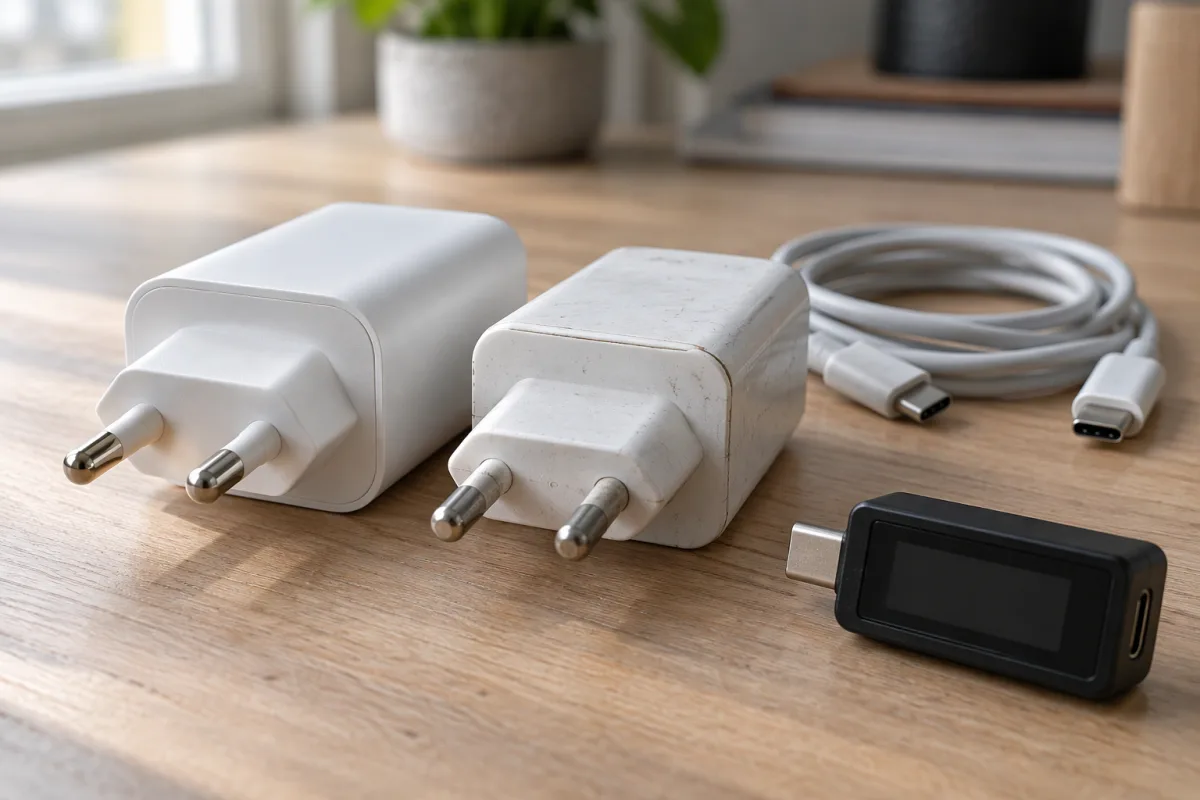
Most everyday ultrabooks ask for 45W or 65W, premium thin-and-lights often want 65W to 100W, and gaming or workstation laptops usually need their original 135W, 180W or 240W supply. Charging a laptop with a lower-wattage adapter is not usually dangerous; it will simply charge slowly and, under heavy load, may not keep up at all. Some laptops show an "adapter not recognised" warning and reduce performance while running on a weak charger. As a rule, buy an adapter rated at or above the laptop's original charger, not below it.
3. Look at the Power Delivery profile, not just the big number
A charger can advertise 65W and still fail on a laptop if it cannot deliver that power in the profile the laptop requests. Laptops typically negotiate 20V, while many phone chargers top out at 9V or 11V. USB Power Delivery covers standard profiles up to 100W, and the newer PD 3.1 standard extends this to 140W, 180W and 240W for larger laptops. Check the output table printed on the charger: a laptop-friendly unit lists 20V at 3.25A or 5A, and a high-power one lists higher voltages as well.
4. Use a cable rated for the power
This is the most commonly missed point in the market. A USB-C cable with a 3A rating is capped at 60W no matter how powerful the charger is. For 65W and 100W charging you need a 5A cable with an e-marker chip, sold as a "100W" or "5A" cable. For the new 140W-plus adapters you need a cable rated for 240W. Cheap cables sold without any rating are often 2A or 3A parts, which is why a 100W charger and a free cable can still charge at 45W or less. Buy the cable with the same care as the charger.
5. Be careful with repurposed phone chargers
A 67W or 120W phone charger is tuned for a specific fast-charging protocol, not for USB PD laptops. Some support 20V and work fine; many do not. If the output table on the adapter never mentions 20V, it is unlikely to power a laptop properly. It may still charge slowly at 5V, or not at all. The reverse is also true: a laptop charger with a PD profile will charge a phone, but usually only at a basic speed, because the phone's private fast-charge standard is not part of the PD handshake.
6. Buy a genuine unit with visible markings
The local market has plenty of unbranded adapters that copy the shape of well-known models. Quality differences show up in isolation, surge handling and long-term heat, exactly the areas that matter with Bangladesh's power supply. Look for a real brand name, a model number, input and output ratings, and certification marks printed clearly on the body. A price that is far below every other shop for the same wattage is a warning, not a bargain. A fake 65W adapter may work for a month before the laptop's charging circuit pays for it.
7. Check plug type and input voltage
Most modern adapters accept 100-240V input, which is fine for Bangladesh's 220-230V supply. What catches people out is the plug itself: imported units often come with a US two-pin plug that does not fit local Type G or Type D sockets without an adapter. A loose plug adapter at the wall is a poor long-term connection for a charger that runs warm for hours. Prefer chargers that ship with the correct plug or a reputable travel adapter, and avoid stacking several cheap adapters together.
8. Test it before you rely on it
A simple USB power tester, sold locally for a few hundred taka, shows the voltage and current the laptop actually negotiates. Plug the charger and cable in, open a heavy app, and confirm the laptop is drawing close to the adapter's rated wattage rather than sitting at 5V. On Windows, the battery report and vendor tools such as Lenovo Vantage, Dell Power Manager or MyASUS also indicate the connected adapter's wattage. If a 65W charger reports as 45W, the cable or the profile is the usual culprit.
9. Plan for heat and unstable power
USB-C adapters run hot, especially compact GaN models under continuous load, and heat shortens their life. Do not cover the charger with papers or leave it under a cushion, and give it open air. In areas with frequent load-shedding and voltage swings, plug the charger into a surge protector, and consider a small UPS for the laptop if you work on deadlines. The point is not only protecting the adapter but protecting the laptop's charging board, which is far more expensive to replace.
10. Buy where you can claim warranty
Adapters fail more often than laptops, usually at the worst time. Pay attention to the seller's return window and warranty terms, and keep the receipt and box. A slightly higher price from a shop that will replace a dead adapter in six months is cheaper than a discount unit with no support at all. If you are buying a charger together with a new laptop, ask whether the shop will confirm compatibility on the spot by plugging it in.
The bottom line
USB-C charging is a good upgrade for most laptops, provided the adapter, the cable and the laptop agree on the same Power Delivery profile. Check the laptop's expected wattage first, buy an adapter that lists 20V in its output table, pair it with a 5A or 100W cable if you need more than 60W, and buy from a seller who stands behind the product. Do those four things and a compact Type-C charger can replace the brick in your bag without any drama.
Looking for a laptop that supports USB-C charging? Browse the latest laptops in Bangladesh on gsmSpaces, and see more practical guides in our Laptop Tips & Tricks section.